Introducing NimbleSign: A Fully Canadian E-Signature Platform, Built and Hosted in Canada
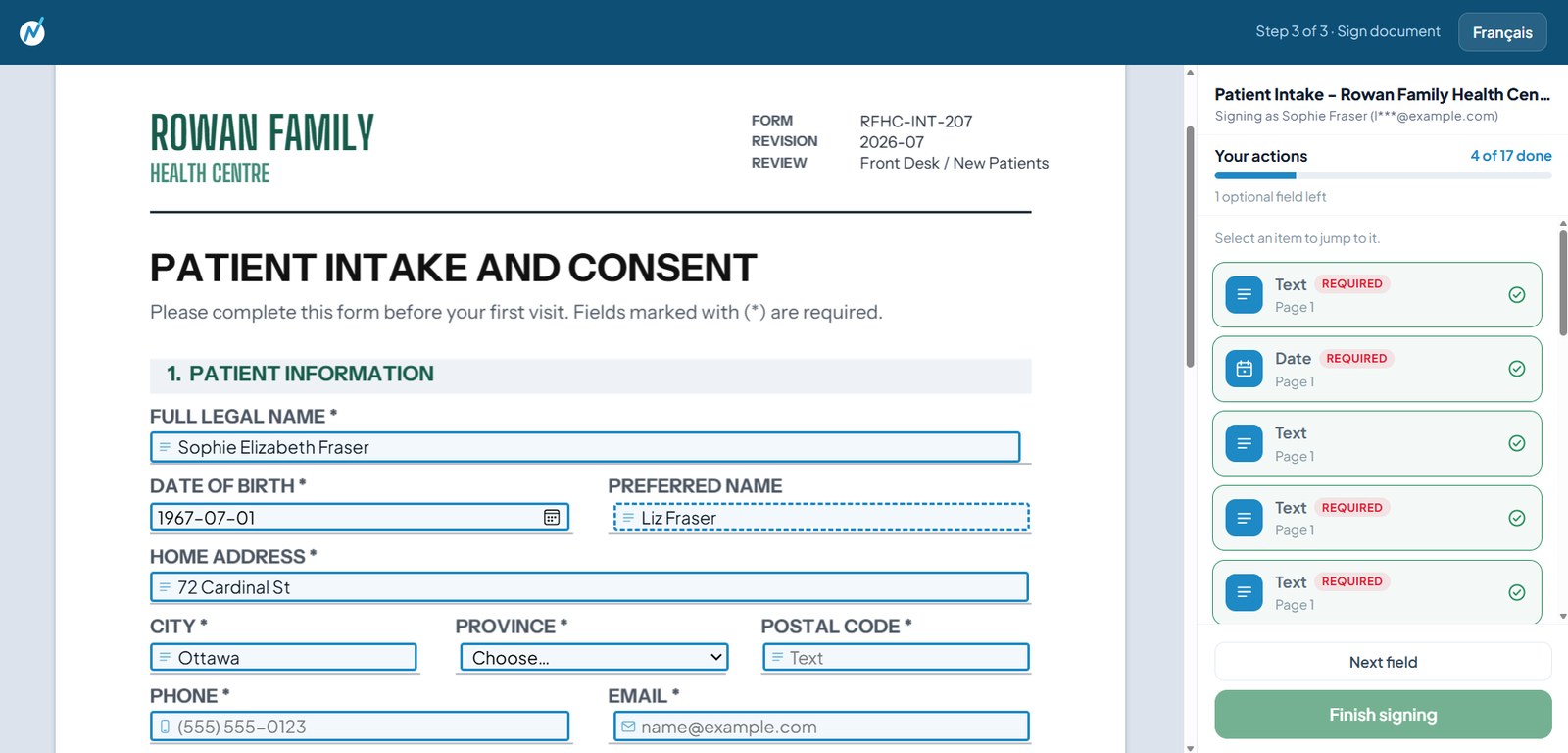
NimbleSign is here: a fully Canadian electronic signature platform, built and hosted in Canada by Nimble. At its core, it handles everyday remote signing: send a document and recipients sign from any device. It also turns tablets into in-person signing stations for places like clinic front desks. Every signature stays in Canada, under Canadian law, with a complete record of who signed what.
Going paperless is the easy part. Keeping your signed documents in Canada while you do it is where organizations get stuck. The best-known e-signature platforms, DocuSign and Adobe Acrobat Sign, are capable tools, but they are foreign-owned, and even their Canadian data-residency options can still be reached under foreign law. For a clinic, a law firm, a municipality, or any organization handling personal information about Canadians, that is a real concern. NimbleSign, built and hosted in Canada by Nimble, was made to answer it: full-featured e-signature that never leaves the country.
The gap NimbleSign was built to fill
The idea came directly from conversations with buyers. Across healthcare, legal, public sector, and business, Nimble's business development team kept hearing the same two things: organizations wanted signing that was quick and simple, and they wanted their documents to stay in Canada.
"The organizations we work with wanted signing they could trust and keep on Canadian soil, but the best-known options are all foreign-owned," said Jeff Kuhn, Senior Business Development Manager at Nimble, who identified the opening in the Canadian market. "There was a clear gap for a genuinely Canadian platform that worked for everyone from a single signer to a whole organization, remote and in person."
NimbleSign also grew out of first-hand observation. For years, while implementing document workflow solutions for clients, from the Digital Mailroom to Accounts Payable automation to the SmartCloud records portal, Kuhn kept running into the same bottleneck.
"In project after project, I watched a client's entire document process run smoothly right up until something needed a signature, and then everything stalled," said Kuhn. "Chasing signatures was still a manual print, sign, and scan step that broke everything we had streamlined and left the administrative staff frustrated. Building a signing platform was a natural extension of the records management work we already do."
NimbleSign is designed to slot into that work: signed documents flow straight back into systems like SmartCloud, so signing becomes one more automated step instead of a break in the workflow.
What NimbleSign does
At its core, NimbleSign is a full e-signature platform for everyday remote signing. Upload a PDF or Word file, place signature fields, initials, dates, checkboxes, and text with click-and-drag tools, choose who signs and in what order, and send a secure link. Signers open it on any device and are guided field by field, with no account, app, or password to deal with. They confirm a code sent by email or text, and email is optional, so someone without one is not stuck.
From there, NimbleSign adds what busy, in-person, and bilingual organizations actually need:
- In-person signing, including unattended kiosks. Leave a tablet at a front desk or in a waiting room and it becomes a self-serve signing station: a patient or customer taps to start, signs on the spot, and the screen resets itself for the next person. A staff member can also start a signing on a shared device and hand it across the desk. Either way it is the same signing experience, and the finished document lands in the same place as everything else. For a clinic, that means a consent form is signed and filed before the patient sits down.
- Set up a form once, reuse it. Build a form with its fields and signing roles a single time, then reuse it by adding names, so everyone sends the same approved version instead of rebuilding it each time.
- Bilingual, per signer. Each signer can receive the document in English or French, which matters for organizations serving bilingual communities or working in Quebec.
- Roles, permissions, and order. Assign roles and permissions, including signer and reviewer roles, and control the order in which a document moves through its signers.
- A record that holds up, and a view of everything. Every completed document is sealed with a hash-verified certificate of completion, a cryptographic seal that proves the record has not been altered since signing, plus a full history of each step. That is exactly the kind of evidence that holds up if a document is ever questioned in a dispute or in litigation. Reminders go out on their own, requests nobody acts on close themselves, and a single list shows who has signed, who has gone quiet, and what is about to lapse.
Built and hosted in Canada
This is the part that sets NimbleSign apart. It is 100% Canadian-owned with no foreign parent, and it runs on Nimble's own Protected B facilities in Canada, staffed by security-cleared people. Your documents and signatures never leave Canadian jurisdiction and are not exposed to the US CLOUD Act. Nimble's infrastructure is SOC 2 Type II audited and ITSG-33 aligned, and self-hosting is available for organizations that want to run it inside their own environment.
That distinction matters, because Canadian data residency is not the same as Canadian control. DocuSign and Adobe Acrobat Sign will store data in Canada, but as foreign-owned companies they can still be subject to foreign laws about that data. With NimbleSign, the company, the servers, and the jurisdiction are all Canadian.
"Clients ask us where their data lives, and for most platforms the honest answer is that it sits in Canada while the company still answers to another country's courts," said Kuhn. "With NimbleSign there is no asterisk. The data, the servers, and the company are all Canadian."
On the legal footing: electronic signatures are legally binding in Canada under PIPEDA and provincial electronic-commerce legislation, such as Ontario's Electronic Commerce Act and British Columbia's Electronic Transactions Act, as long as the signer's identity and intent are clear and the document's integrity is preserved. NimbleSign's authentication, tamper-evident records, and hash-verified certificates of completion are built around that standard.
Made for any organization
NimbleSign is deliberately broad. It works for one person, a small office, or a whole organization, anywhere paperwork needs a signature and a record. A few of the places it fits:
- Clinics and healthcare: consent and intake forms signed at the front desk on a tablet, filed and stored in Canada before the appointment starts.
- Law firms and professional services: retainers and closings signed in the right order, with a record that still holds up years later.
- Public sector and education: procurement, forms, and approvals where the first question is where the data lives, answered simply because it lives in Canada, and bilingual throughout.
- Trades and field work: waivers and work orders signed on a phone by people who will not install anything, using a texted code instead of email.
Property managers, non-profits, insurance brokers, and HR teams use it the same way: send forms out, and file them when they come back.
Nimble helps you set it up
One of Nimble's long-standing strengths is that it does not just hand over software. Depending on what an organization needs, Nimble can provide the platform to run yourself, or work with you to tailor it around your specific workflow. If you are not sure which fits, Nimble is glad to talk it through and help you land on the right one.
"We are always happy to sit down with a client and set NimbleSign up around how they actually work," Kuhn said. "A clinic collecting consent at a front desk and a law firm routing a multi-party agreement have very different needs, and we can configure the platform for each of them."
NimbleSign comes in a few plans to match how much you send, from self-serve Individual and Team plans you can start the same day to a tailored Enterprise plan for larger organizations that need every feature, several sites, or signing built into their own systems.
How NimbleSign compares to DocuSign and Adobe Acrobat Sign
NimbleSign does the same core remote signing DocuSign and Adobe Acrobat Sign are known for. The differences that matter for a Canadian organization:
- Ownership and jurisdiction: DocuSign and Adobe Acrobat Sign are foreign-owned, with Canadian data-residency options that can still fall under foreign law. NimbleSign is Canadian-owned and hosted, outside CLOUD Act reach.
- In-person signing: both incumbents offer host-facilitated in-person signing; NimbleSign does that and adds unattended, self-serve tablet kiosks.
- Who it is for: the big platforms are enterprise-oriented; NimbleSign scales from a single signer to a whole organization.
- Setup: the large platforms are self-serve; Nimble can also tailor NimbleSign to your workflow.
Frequently asked questions
What is NimbleSign? NimbleSign is a fully Canadian electronic signature platform, built and hosted in Canada by Nimble. It handles remote signing, sending a document that recipients complete from any device, and in-person signing, including self-serve tablet kiosks, with reusable forms, bilingual delivery, role-based signing, and a hash-verified certificate of completion for every signature.
Who is NimbleSign for? Any organization that needs signatures and a reliable record, from a single person to a whole organization. It is a natural fit for clinics and healthcare, law firms and professional services, public sector and education, and trades and field work, among many others.
Can documents be signed remotely and in person? Both. Most signing is remote: send a secure link and the signer completes the document from any device, with no account or app. In person, NimbleSign turns a tablet into a self-serve kiosk for a front desk or waiting room, or lets a staff member start a signing and hand the device to the signer.
Where is the data stored? In Canada, on Nimble's own Protected B facilities. NimbleSign is 100% Canadian-owned with no foreign parent, so your documents are not exposed to foreign laws like the US CLOUD Act, and self-hosting is available.
Are documents signed with NimbleSign legally binding in Canada? Yes. Electronic signatures are legally binding in Canada under PIPEDA and provincial electronic-commerce legislation when identity, intent, and document integrity are preserved. NimbleSign's authentication and hash-verified certificates of completion are built to meet that standard.
How is NimbleSign different from DocuSign or Adobe Sign? It does the same core remote signing, but it is fully Canadian-owned and hosted rather than a foreign-owned service with Canadian data residency, it adds self-serve in-person kiosks, it scales from one person to a whole organization, and Nimble can tailor it to your workflow.
How is NimbleSign priced? NimbleSign offers a few plans to match how much you send: self-serve Individual and Team plans you can start the same day, and a custom-quoted Enterprise plan for larger organizations that need every feature, several sites, or integration with their own systems.
How can we see NimbleSign in action? Start a free 7-day trial and send your first forms the same day, no call needed. If you would rather see it first, or you are a larger organization, request a demo and Nimble will run NimbleSign on one of your own forms and show you the signed record that comes out the other side.
Try it on one of your own forms
If you want e-signature that keeps your documents in Canada, works remotely and at the front desk, and fits how your organization actually runs, NimbleSign is worth a look. Start a free 7-day trial and send your first forms today, no call required. For a larger organization, or to see it run on one of your own forms first, request a demo.
More from the blog

Data Residency Isn't Data Sovereignty: What Canadian Businesses Should Know About E-Signatures
Storing your signed documents on Canadian servers is not the same as keeping them under Canadian law. If your e-signature provider is US-owned, the US CLOUD Act can compel it to hand over your data even when that data sits in Canada. For genuine data sovereignty, the provider itself has to be Canadian, not just its data centre.

How the Kingston ODSP Office Recovered 7,500 Files After a Fire
After a December 2016 fire compromised roughly 12,000 client files at the Kingston ODSP office, Nimble cleaned the records and digitized and indexed 7,500 active files within a three-month window. About 4 million pages of client files are now securely accessible online through a Canadian-hosted portal.

Document Scanning In-House vs. Outsourcing: How Canadian Organizations Decide
Choosing between in-house and outsourced document scanning comes down to five factors: volume, record sensitivity, compliance and data sovereignty, in-house capacity, and risk. In-house suits small, ongoing, low-sensitivity scanning; outsourcing suits large backfile conversions, sensitive records, and firm deadlines. Here is how Canadian organizations weigh the trade-offs before starting a project.